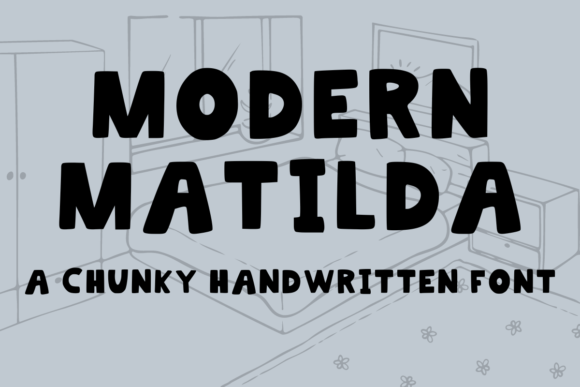
Modern Matilda: A Chunky Display Font for Digital Design
When you are building a web layout that needs personality without sacrificing polish, finding the right typeface can feel like a search for a needle in a crowded font library. You want something that stops the scroll, signals a modern brand, and still reads clearly on a screen. That is exactly where Modern Matilda steps in. This chunky handwritten display font brings a handcrafted feel to digital interfaces while keeping the edges clean enough for professional use. Each letter carries its own character, yet the set remains cohesive enough to build a consistent online identity.
Modern Matilda is not a subtle script nor a rigid geometric sans serif. It sits somewhere in the sweet spot between playful and deliberate. The strokes are thick, the curves are generous, and the overall impression is warm without being cartoonish. For web designers and UI creators who need a display font that works for headlines, hero messages, and brand accents, this typeface offers a straightforward way to inject human texture into a screen-based experience.
What Makes Modern Matilda Stand Out in Web Design
The first thing you notice when you place Modern Matilda into a mockup is how much presence it has. The chunky stroke weight gives it a solid, confident look that holds up well on both light and dark backgrounds. Unlike many handwritten fonts that feel too delicate or uneven for digital use, this one maintains a consistent visual rhythm. Each glyph feels intentional, which matters when you are designing a landing page header that needs to communicate trust and creativity at the same time.
From a digital design perspective, the font works exceptionally well for short attention-grabbing phrases. Think of a hero section on a product launch page, a bold call-to-action button, or a featured testimonial quote. The handwritten style adds a human touch that can make a brand feel approachable, while the chunky weight ensures the text remains legible even on smaller screens. Modern Matilda is a modern typography tool that helps you break away from sterile default fonts without losing readability.
Another strength is its versatility in tone. You can pair it with a clean sans serif font for body copy to create a balanced hierarchy, or use it alone as a standalone statement in a social media graphic. The font does not force a specific mood; it adapts to the surrounding design elements. This makes it a reliable choice for freelance web designers, UX teams, and brand builders who need a premium font that works across multiple client projects.
Where to Use Modern Matilda in Digital Interfaces
Web designers often struggle with where to place a decorative display font without overwhelming the layout. Modern Matilda solves that problem by being bold enough to lead but not so loud that it distracts from the content. Here are the most effective digital use cases I have found while testing it in real layouts.
Hero Headlines and Landing Page Headers
The most natural home for Modern Matilda is the hero section. When you have a few words that need to communicate the core value of a product or service, this font delivers impact. For a boutique online store, a headline like “Handmade with Care” set in Modern Matilda immediately conveys craftsmanship and personality. For a coaching website, a short phrase such as “Start Your Journey” feels inviting and human. The chunky letters work well against background images, especially when you add a subtle text shadow or overlay to maintain contrast.
Call-to-Action Buttons and Short Labels
Because Modern Matilda is a display font with thick strokes, it also performs well in button text and short labels. A button that says “Join Now” or “Shop the Collection” becomes a visual anchor when set in this typeface. The handwritten quality adds a friendly nudge rather than a corporate command. However, keep the text short. One to three words is the sweet spot for buttons, as longer phrases can become harder to scan at small sizes.
Section Headings and Subheadings
Using Modern Matilda for section headings throughout a landing page or a blog creates a consistent visual rhythm. It breaks up long blocks of body text and gives the page a clear hierarchy. For example, on a course sales page, you can use a sans serif font for the main body and reserve Modern Matilda for each section title. This pairing keeps the page readable while adding a touch of personality to the structure.
Brand Logos and Decorative Accents
Many digital brands are moving away from rigid logo lockups in favor of more expressive typography. Modern Matilda works well as a logo wordmark, especially for creative businesses, lifestyle brands, and personal portfolios. You can also use it for decorative accents such as pull quotes, testimonial highlights, or product badges. Its chunky form makes it a good candidate for hero text that doubles as a visual design element.
Readability and Responsive Considerations
One of the biggest concerns when using a handwritten display font in web design is readability, especially on mobile devices. Fortunately, Modern Matilda handles responsive layouts well. The thick stroke weight means the letters remain legible even at smaller sizes, though I recommend using it at a minimum of 24px for body-level accents and 36px or larger for headlines. On very small screens, test the font at your intended breakpoints to ensure the descenders and ascenders do not become cramped.
On dark backgrounds, the font pops beautifully. The chunky shapes create a strong silhouette that maintains clarity even when the background is busy or textured. On light backgrounds, the font feels warm and friendly. If you are placing Modern Matilda over an image, use a semi-transparent overlay or a dark gradient to keep the text readable. Avoid using it for long paragraphs or dense body copy. This is a display font by design, and it performs best when used sparingly to create emphasis.
Another practical tip is to pay attention to letter spacing. Depending on the design context, you may want to add a small amount of tracking to improve readability, especially when the font is used in all caps or for longer phrases. The font’s natural rhythm is already balanced, but small adjustments can make a big difference in how the text scans on a screen.
Font Pairing Strategies for Modern Matilda
Pairing a decorative display font with a reliable body typeface is a core skill in digital design. Modern Matilda pairs well with clean sans serif fonts such as Inter, Open Sans, or Work Sans. The contrast between the handwritten warmth of the display font and the neutral clarity of a sans serif creates a clear visual hierarchy. For a more editorial feel, you can pair it with a serif font like Merriweather or Playfair Display. This combination works well for personal blogs, lifestyle magazines, and portfolio sites that want a sophisticated yet approachable tone.
If you are building a brand identity that includes logo design, social media graphics, and web content, using Modern Matilda as the headline font and a simple sans serif for body copy gives you a cohesive system that is easy to apply across different media. The key is to keep the display font limited to short, impactful moments and let the body font do the heavy lifting for readability.
Practical Examples for Digital Projects
To give you a concrete sense of how Modern Matilda performs, here are a few real-world scenarios where this font shines.
- Creative Portfolio Site: Use Modern Matilda for your name in the hero section and for project category headings. Pair it with a light sans serif for project descriptions. The handwritten feel adds a personal touch that sets you apart from other designers who use stock fonts.
- Boutique Online Store: Set product collection names and sale banners in Modern Matilda. The chunky letters create a sense of warmth and approachability, which works well for handmade goods, organic products, or lifestyle brands.
- Coaching Website: Use the font for the main value proposition on the homepage and for testimonial pull quotes. The human quality of the typeface helps build trust and connection with potential clients.
- Course Sales Page: Reserve Modern Matilda for the course title and key benefit headlines. Use a clean sans serif for the curriculum details and pricing. This keeps the page visually engaging without sacrificing clarity.
- Digital Brand Kit: Include Modern Matilda as the headline font in your brand guidelines. Its versatility makes it suitable for both web and print applications, including social media graphics, email headers, and presentation slides.
File Formats, Licensing, and Webfont Options
When selecting a commercial font for a digital project, you need to check the licensing terms carefully. Modern Matilda is available as a premium font, and the license typically covers web use, client projects, and digital products. Make sure you purchase a license that includes webfont embedding if you plan to use it on a live website. Some licenses also include desktop use, which is handy for mockups and social media graphics.
The font is available in standard file formats such as OTF, TTF, and WOFF, which makes it compatible with most web design tools, content management systems, and design software. If you are using a platform like Webflow, Squarespace, or WordPress, you can upload the webfont files directly or use a @font-face declaration. For design tools like Figma, Sketch, or Adobe XD, the desktop font files work without any issues.
Depending on the version you purchase, Modern Matilda may include alternate characters, ligatures, or stylistic sets. These extras give you more control over the typography and allow you to create unique letter combinations that avoid repetition. If multilingual support is important for your project, check the character set to ensure it covers the languages you need. Many display fonts are limited to Latin-based alphabets, so verify this before purchasing.
Using a premium font like Modern Matilda in your client projects also adds a level of professionalism that free fonts often cannot match. The design is more refined, the kerning is more consistent, and the overall quality supports a polished brand identity. When you invest in a quality typeface, your work stands out.
Final Practical Notes for Web Designers
Modern Matilda is a handwritten font that brings a modern, chunky aesthetic to digital interfaces without feeling gimmicky. It is a tool that helps you build visual hierarchy, convey brand tone, and create memorable user experiences. Whether you are designing a landing page, a product launch, or a complete brand identity, this font offers a reliable way to add warmth and personality to your work.
Remember to test the font on different screen sizes, check contrast against your chosen backgrounds, and pair it with a clean body typeface for the best results. With thoughtful placement, Modern Matilda can become a defining element of your digital design toolkit. It is a creative font that respects the rules of readability while giving you the freedom to express a brand’s unique voice.